
Tips & tricks
Plan Before You Build: A Credit-Smart HVAC App Workflow
· By Zachary Mitchell
Turn an HVAC dispatch idea into a focused first build. Learn how to explore, plan, and request precise changes while reducing avoidable rework.
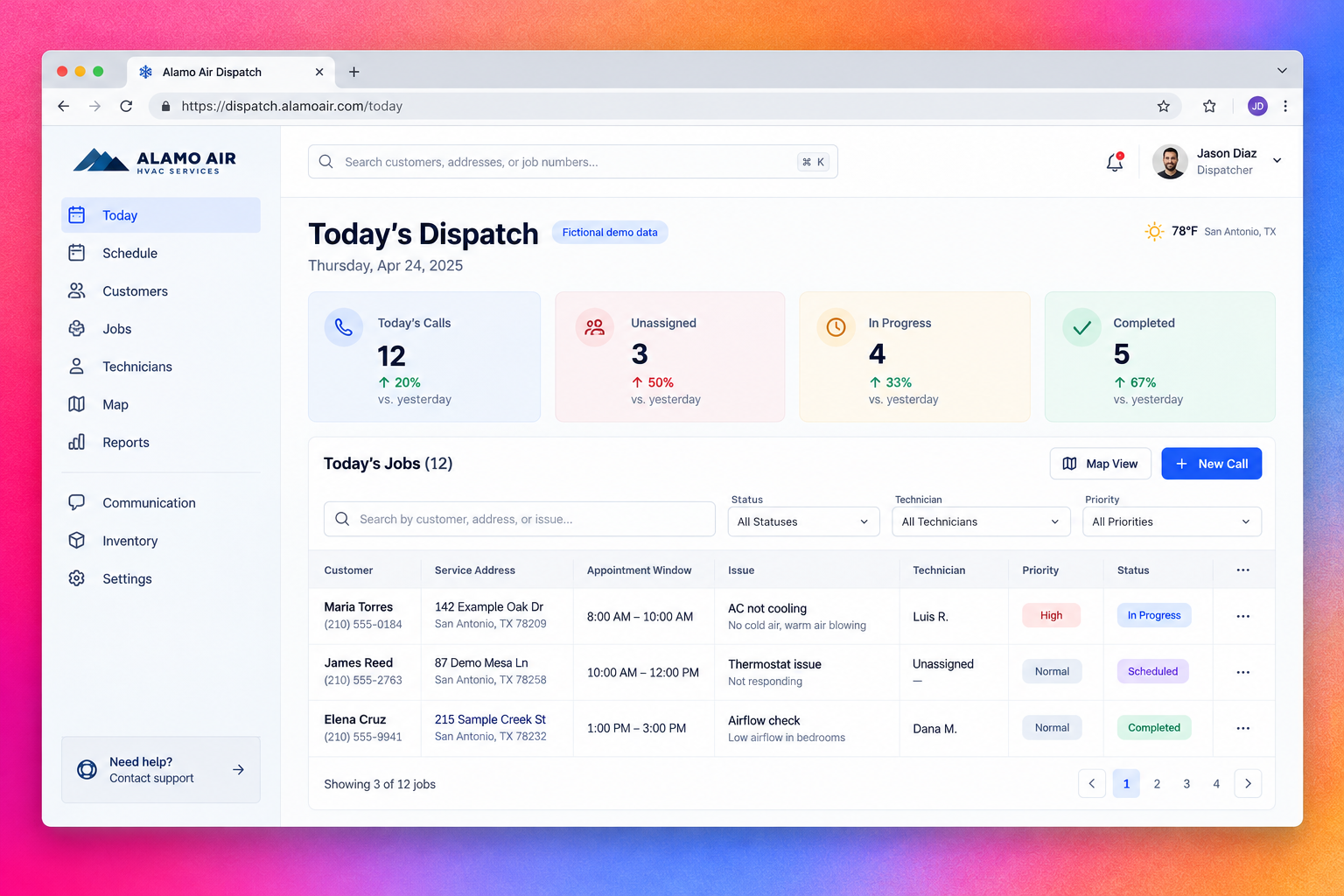
A busy San Antonio HVAC contractor does not need a complicated app to get started. They need to see today’s calls, know who is available, and stop losing job updates between phone calls and text messages.
I’m Zachary Mitchell, Lovable Ambassador for the San Antonio Lovable community. My practical rule for getting more out of Lovable: clarify the problem, agree on a plan, then build the smallest useful workflow.
The idea
Think of exploring, planning, and building as three jobs in your process—not as instructions to find three particular buttons in Lovable.
- Explore the problem: Which problem matters most? What should the app do? What can wait?
- Plan the approach: Which screens, fields, and interactions will solve that problem? Ask for a proposed approach before implementation.
- Build the solution: Ask Lovable to create or change the app once the requirements are clear.
Lovable has announced free chat, making exploratory conversation a useful place to sharpen an idea. Do not assume that every project interaction, planning request, or implementation action is free; check the current usage and billing information available to you.
Our example is Alamo Air Dispatch, a fictional HVAC contractor’s internal dashboard. Version one will help a dispatcher assign service calls and update job statuses. It will not process payments, optimize driving routes, or send customer messages.
That boundary is a practical way to reduce avoidable rework. Clear scope reduces the chances of building features you immediately ask Lovable to remove; it does not guarantee a particular credit saving.
Step-by-step in Lovable
Start with a business conversation. Before requesting a dashboard, explain who will use it and what currently goes wrong. For our contractor, the dispatcher is juggling incoming calls while technicians report progress from the field. The first question is whether assignment visibility or customer intake is the bigger bottleneck.
Ask Lovable to identify missing requirements rather than fill every gap with assumptions. Decide what “scheduled,” “assigned,” and “completed” mean before those terms become buttons and filters. In particular, distinguish a job’s assigned technician from its progress status.
Next, write a planning prompt with six ingredients: business context, primary user, core task, required data, visual direction, and explicit exclusions.
"Plan a responsive internal dashboard called Alamo Air Dispatch for a small San Antonio HVAC contractor. The primary user is a dispatcher who assigns service calls and tracks job progress. Include a Today screen with KPI cards and a job table. Each job needs a customer name, service address, appointment date and window, issue, technician, priority, and status. Use fictional sample data, clear typography, and readable status labels. Let the dispatcher filter jobs, assign a technician, and change a status. Do not add payments, messaging, route optimization, or external integrations. For this prototype, changes do not need to persist after refresh. Propose the structure and identify unresolved decisions. Do not implement yet."
Review the proposed structure before asking for implementation. Resolve assumptions and request a short acceptance checklist. Define whether KPI cards summarize all of today’s jobs or only the filtered results, so you can test their behavior consistently.
Then explicitly request the initial build. Keep it focused on the dispatcher workflow. A polished demonstration with fictional data is enough to test whether the layout makes sense; it is not yet a production dispatch system.
Test a complete sequence in the preview
find an unassigned call, assign a technician, change its status, and filter the table. Check that the KPI cards use the underlying job data and follow the agreed filtering behavior. Repeat on a narrow screen.
Finally, iterate with one coherent change at a time. If the assignment flow works but the table is difficult to scan, request a table readability pass—not a new dashboard. Before adding real customer information, separately plan authentication, access permissions, and persistent storage.
Prompts to try
Use exploratory chat to find the smallest worthwhile project:
"I run an HVAC company with one dispatcher and six technicians. We lose track of job assignments in text messages. Ask me five questions to identify the smallest useful internal app. Do not implement anything yet."
Use planning to expose assumptions:
"Plan the Alamo Air Dispatch prototype. Propose the screens, job fields, status definitions, and five acceptance checks. Identify unresolved decisions. Keep customer messaging and payments out of scope. Do not implement yet."
Use implementation requests with clear boundaries:
"Implement the agreed dispatcher prototype using fictional data. Prioritize the Today screen and its assignment workflow. Keep the approved scope; do not introduce additional modules."
Use precise feedback instead of a broad redesign request:
"On the Today screen, the technician column is hard to scan. Increase its readable width and make Unassigned visually distinct with a text label. Preserve the existing filters, KPI calculations, and assignment behavior."
Pro tips
- Define what success looks like. ‘A dispatcher can find and assign an urgent unassigned call’ is more useful than ‘make it powerful.’
- Group related adjustments. Table spacing, column widths, and status-label readability belong in one focused pass. Authentication and invoice creation do not.
- Include what must stay unchanged. This helps protect working behavior while you refine another area.
- Describe bugs with steps, expected results, and actual results. Mention whether the problem happens consistently or only under a particular filter.
- Inspect each result before prompting again. Repeated requests based on an unchecked preview can create unnecessary rework.
Watch out for
Planning is not a promise of a specific credit cost. Avoid treating any workflow as a guaranteed number of builds or credits. Check current usage and stop to reassess when repeated revisions are not improving the same acceptance check.
Also, distinguish a working-looking prototype from an operational tool. Sample technician assignments do not establish secure access, reliable persistence, or safe handling of customer addresses. Verify those separately before real dispatch work begins. This prototype deliberately does not require changes to survive a refresh.
The goal is not the fewest prompts at any cost. It is fewer ambiguous prompts, fewer surprise features, and a first build your HVAC team can actually evaluate.